When agents write the code, trust is in short supply.
05 is the acceptance layer for AI-written code. The agent declares what it will do before it starts; 05 seals that plan, checks the result on the change and signs the evidence. When the agent is done, you receive the intent and outcome results. No pull request to review. If something did not match, you read a brief that outlines the critical details, instead of the diff. When several agents work in one repository, 05 keeps them out of each other's way.
Install
curl -fsSL https://use05.dev/install.sh | shnpm install -g @use05/clinpm install --save-dev @use05/cliThen, in your repository, run use05 init (npx use05 init for a project install). macOS and Linux. Read the docs.
Open source. The command line tool and the runner are free under Apache-2.0 at github.com/use05-dev/use05.
Stop reading every line. Accept changes on evidence.
An agent can write a change in minutes, and nobody can read every line at that pace. What keeps up is saying what you want before the work starts, then accepting the change when the evidence shows it was done.
Without 05
- You read every line the agent wrote.
- You take "tests pass" on the agent's word.
- You ask the agent to follow the rules and hope it does.
- Review becomes the bottleneck.
With 05
- The agent states its plan before it starts.
- Your checks run on the change, and the result is signed.
- 05 compares what changed with what was planned.
- You approve from one brief, then land and push. No pull request needed.
Every change comes with signed evidence, not "trust me, tests pass."
Agents write code faster than people can review it
Review is the bottleneck
Agents produce changes faster than anyone can read them, so reading every line stops working.
"Tests pass" is only a claim
When an agent says its tests pass, you have its word. It becomes a fact when something independent runs the checks on the change.
Prompting is not a control
Telling an agent the rules does not stop it from breaking them. A real control blocks the change when a rule is broken.
You own the request and the acceptance. Agents own the plan and the work. 05 holds them to the plan.
One change from start to finish. The step-by-step page explains each stage.
What you get with 05
A command line tool that stays on your machine
The use05 command line tool is free and open source. It runs on your machine, with no account and no telemetry. Nothing is uploaded.
Signed receipts anyone can verify
The runner runs your checks on the change and signs the result. Anyone can verify the receipt offline, without an account.
How receipts workThe plan comes first
The agent declares its plan and the files it will touch before it starts, or you set them with use05 start --scope. 05 then compares what changed with that plan. If no scope was declared, 05 says it could not check. No AI decides whether a change passes.
A brief instead of the diff
When the agent is done, you get one brief with the intent, the outcome and the critical details. It takes minutes to read. When everything matched, it says there is nothing to read.
What the brief containsRules that only get tighter
Your rules live in a policy file in the repository. An organisation can sign a minimum that teams can tighten but never loosen. Folders and files can be locked, append-only, protected from deletion or closed to reading. Approvals are signed with a passphrase-protected key, and every bypass is logged.
Locked folders and file rulesHooks, a pre-push gate and CI
Hooks for Claude Code and Codex, a git pre-push gate and a CI template. Each one is true about what it can and cannot enforce.
05 with Claude Code and CodexWhat the command line tool actually prints
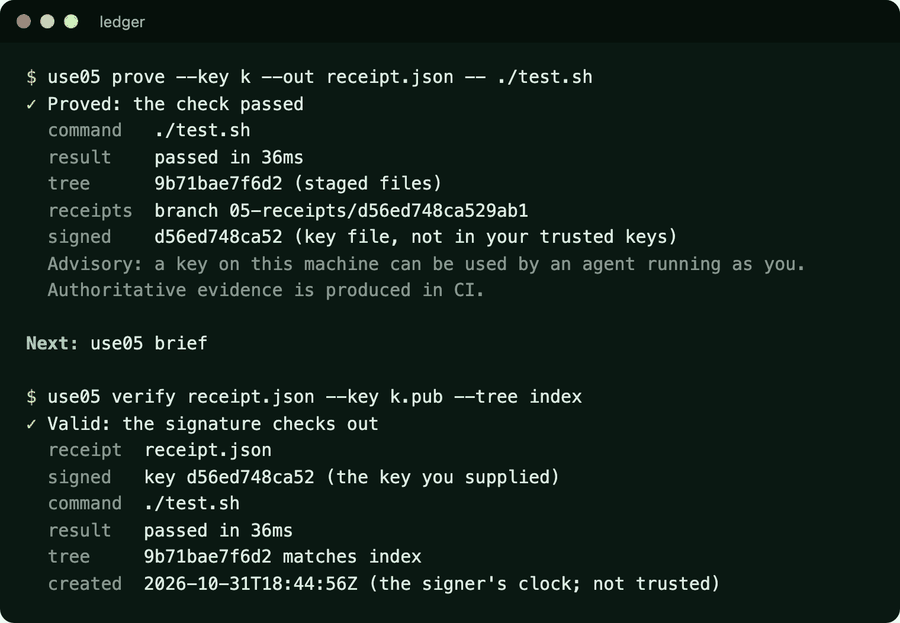
These are screenshots of the real use05 tool on a demo repository, not mockups. Notice how often it says advisory: 05 tells you how strong its own controls are.
-

Prove, then verify. use05 proveruns a check on the change and signs a receipt.use05 verifychecks the receipt offline, with no account and no network. -

Failures are evidence too. A failing check is still recorded in a valid receipt, and use05 verifysays clearly that it did not pass. -

Set up in one command. use05 initlists what it changed, what it left alone and what is not covered yet.use05 uninstallreverses it. -

Bare use05shows where you stand. It shows the current task, whether the staged change would be allowed and which controls are on, followed by a short menu. -

The brief replaces the diff. It covers the intent, the outcome, the evidence, anything that drifted from the plan, the approvals, what is unknown and how to undo it, then gives one decision with its reasons. -

When everything matched, there is nothing to read. The change stayed inside its declared scope and its checks passed, so the brief says so in one line. -

Land it and nothing is left behind. use05 landmoves an allowed change into its target branch, then removes the agent's finished branch and worktree. -

A push the gate does not allow. The pre-push hook stops it, names the rule and the next step, and says that --no-verifywould skip it, because the hook is advisory. -

A person approves, with a passphrase an agent does not have. The approval is signed, tied to this exact content and expires. The brief then says allow. -

An agent that edits the rules is stopped. Hooks refuse risky commands and protected paths, and tell the agent to ask a person. They are advisory, and step aside if 05 itself breaks. -

Doctor tells you how strong each control is. Hooks and the pre-push gate are advisory. Without a CI check, nothing is stronger than advisory, and doctor says so.
- ≈ 8 ms added to each agent action by 05's hooks, measured on a repository of 3,000 files.
Measured on the current release in a dev container. Your machine will differ. More measurements are on the receipts page.
A control is only as strong as where it runs. 05 tells you which is which.
Hooks, the pre-push gate and receipts made on your machine are advisory, because an agent running as you can reach them. A required CI check, with evidence signed where the agent cannot reach, is what enforces. See where each control runs and how strong it is.
The core is free. A product for teams is launching soon.
There is no pricing yet.
For one developer
- The
use05command line tool, the runner and the receipt format. - Policy, a signed organisation minimum, and folder and file rules.
- Open source under Apache-2.0.
05 for teams
- A simple web layer for managing how your team works in its code.
- Shared policy and an approval inbox.
- Audit history and SSO.
- Handles metadata only, never your code.
Several agents, one codebase, no collisions
Run as many agents as you like. 05 coordinates them so they do not overwrite each other's work. How it keeps them apart.
Each agent claims an area
An agent declares where it will work before it starts, and that area is reserved for it.
The others are told
If another agent plans or edits inside that area, it is told who holds it and why, both when it plans and at every edit. Your policy can make it ask a person, or refuse.
Each change lands on its own
Every agent works on its own branch and worktree. A change lands only exactly as it was checked, then its branch and worktree are cleaned up.
Your agents, your Git host
Claude Code and Codex
Currently supported by 05, through hooks that watch the session. Details.
Any other agent
Works through a generic hook. The git pre-push gate and the CI template check every change, whoever wrote it.
GitHub first
05 works with any Git host and starts with GitHub. The host only enforces, so you can switch hosts. 05 does not try to become one.
Common questions
More on the FAQ page.
Do I still need pull requests?
No. You approve, run use05 land and push. Pull requests still work if your team wants them.
Does 05 use an AI to judge my code?
No. Fixed rules compare the declared plan with what changed and check the signed evidence. The same change always gets the same answer.
What happens if 05 itself breaks?
It gets out of the way and tells you. A failure is always shown, never reported as a pass.
Try 05 on your own repositories
The source, install steps and docs are on GitHub. Have a question, or want to tell us which agent and Git host you use? Email us. No forms, no cookies.